# Overview (/docs/mcp)

<!-- agent-signals: reading_time_min: 5 · est_tokens: 2958 · updated: 2026-07-30 -->
Related: [API key](/docs/api-key.md), [Billing & limits](/docs/billing.md), [E2B CLI](/docs/cli.md), [Running commands in sandbox](/docs/commands.md), [Cookbook](/docs/cookbook.md), [Filesystem](/docs/filesystem.md)

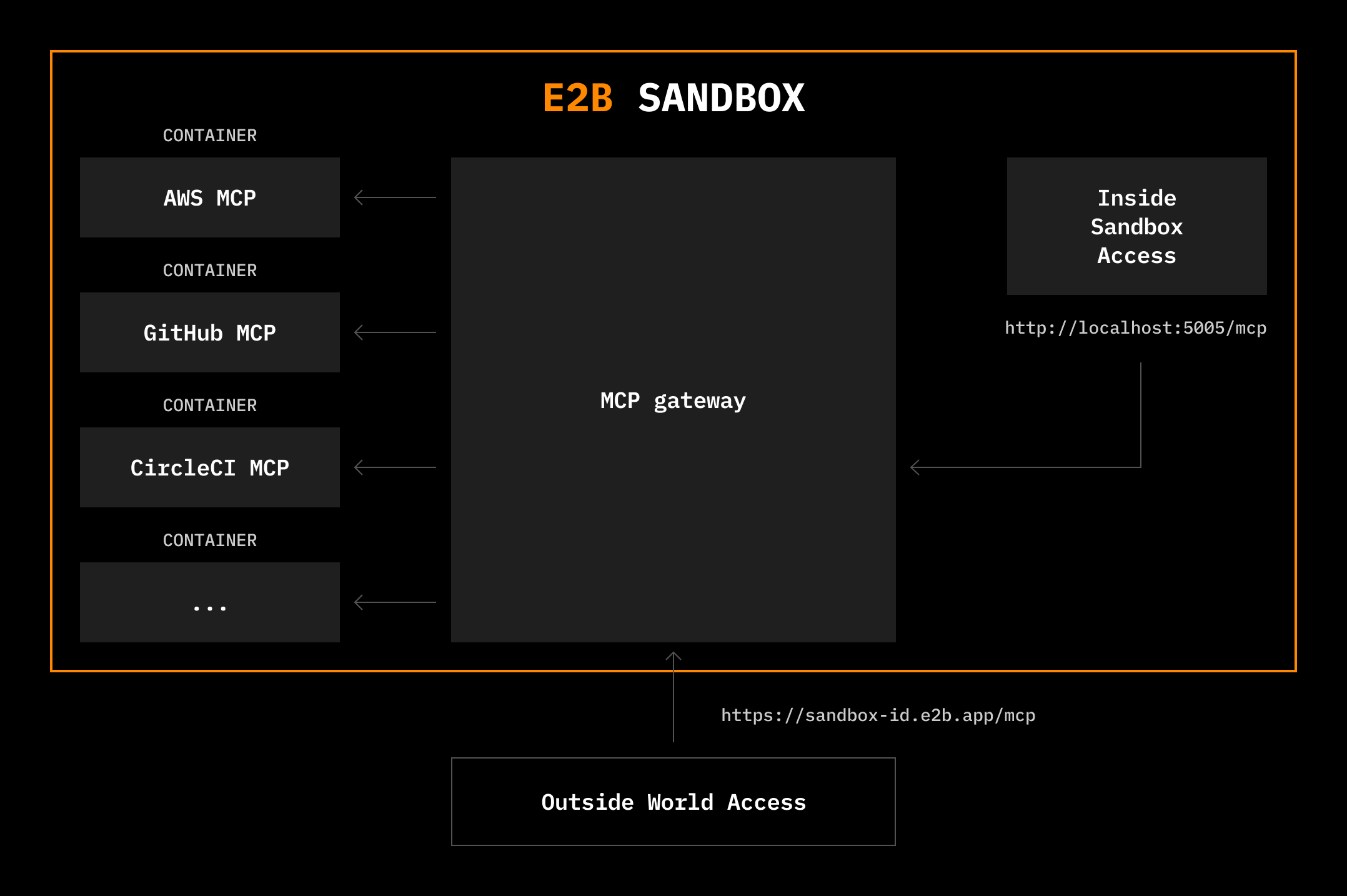
E2B provides a batteries-included MCP gateway that runs inside sandboxes, giving you type-safe access to 200+ MCP tools from the [Docker MCP Catalog](https://hub.docker.com/mcp) or [custom MCPs](/docs/mcp/custom-servers) through a unified interface. This integration gives developers instant access to tools like [Browserbase](https://www.browserbase.com/), [Exa](https://exa.ai/), [Notion](https://www.notion.so/), [Stripe](https://stripe.com/), or [GitHub](https://github.com/).

The [Model Context Protocol (MCP)](https://modelcontextprotocol.io/docs/getting-started/intro) is an open standard for connecting AI models to external tools and data sources. E2B sandboxes provide an ideal environment for running MCP tools, giving AI full access to an internet-connected Linux machine where it can safely install packages, write files, run terminal commands, and AI-generated code.
<Frame>
  <img src="/_assets/14f782435a9ebb7cb13ca246e950e81a4558a2f8afca2709a51e52c715215fc3" />
</Frame>

<CodeGroup>
  <CodeBlockTabs defaultValue="TypeScript" groupId="python+typescript">
    <CodeBlockTabsList>
      <CodeBlockTabsTrigger value="TypeScript">
        TypeScript
      </CodeBlockTabsTrigger>

      <CodeBlockTabsTrigger value="Python">
        Python
      </CodeBlockTabsTrigger>
    </CodeBlockTabsList>

    <CodeBlockTab value="TypeScript">
      ```typescript  
      import Sandbox from 'e2b'

      const sbx = await Sandbox.create({
          mcp: {
              browserbase: {
                  apiKey: process.env.BROWSERBASE_API_KEY!,
                  geminiApiKey: process.env.GEMINI_API_KEY!,
                  projectId: process.env.BROWSERBASE_PROJECT_ID!,
              },
              exa: {
                  apiKey: process.env.EXA_API_KEY!,
              },
              airtable: {
                  airtableApiKey: process.env.AIRTABLE_API_KEY!,
              },
          },
      });

      const mcpUrl = sbx.getMcpUrl();
      const mcpToken = await sbx.getMcpToken();

      // You can now connect the gateway to any MCP client, for example claude:
      // This also works for your local claude!
      await sbx.commands.run(`claude mcp add --transport http e2b-mcp-gateway ${mcpUrl} --header "Authorization: Bearer ${mcpToken}"`, { timeoutMs: 0, onStdout: console.log, onStderr: console.log });

      await sbx.commands.run(
          `echo 'Use browserbase and exa to research open positions at e2b.dev. Collect your findings in Airtable.' | claude -p --dangerously-skip-permissions`,
          { timeoutMs: 0, onStdout: console.log, onStderr: console.log }
      )

      ```
    </CodeBlockTab>

    <CodeBlockTab value="Python">
      ```python  
      import asyncio
      from e2b import AsyncSandbox
      import os
      import dotenv

      dotenv.load_dotenv()

      async def main():
          sbx = await AsyncSandbox.create(mcp={
              "browserbase": {
                  "apiKey": os.getenv("BROWSERBASE_API_KEY"),
                  "geminiApiKey": os.getenv("GEMINI_API_KEY"),
                  "projectId": os.getenv("BROWSERBASE_PROJECT_ID"),
              },
              "exa": {
                  "apiKey": os.getenv("EXA_API_KEY"),
              },
              "airtable": {
                  "airtableApiKey": os.getenv("AIRTABLE_API_KEY"),
              },
          })

          mcp_url = sbx.get_mcp_url()
          mcp_token = await sbx.get_mcp_token()

          # You can now connect the gateway to any MCP client, for example claude:
          # This also works for your local claude!
          await sbx.commands.run(f'claude mcp add --transport http e2b-mcp-gateway {mcp_url} --header "Authorization: Bearer {mcp_token}"', timeout=0, on_stdout=print, on_stderr=print)

          await sbx.commands.run(
              "echo 'Use browserbase and exa to research open positions at e2b.dev. Collect your findings in Airtable.' | claude -p --dangerously-skip-permissions",
              timeout=0, on_stdout=print, on_stderr=print
          )

      if __name__ == "__main__":
          asyncio.run(main())
      ```
    </CodeBlockTab>
  </CodeBlockTabs>
</CodeGroup>

## Documentation [#documentation]

<CardGroup cols="2">
  <Card title="Quickstart" icon="<svg xmlns=&#x22;http://www.w3.org/2000/svg&#x22; viewBox=&#x22;0 0 24 24&#x22; fill=&#x22;none&#x22;><path d=&#x22;M8 10.1667L12.1232 6.04344C13.2481 4.91858 13.8105 4.35614 14.4312 3.90314C15.7047 2.9737 17.1818 2.36187 18.7395 2.11858C19.4988 2 20.2942 2 21.885 2C21.9681 2 22 2.03812 22 2.11504C22 3.70584 22 4.50125 21.8814 5.26046C21.6381 6.81818 21.0263 8.29527 20.0969 9.56878C19.6439 10.1895 19.0814 10.7519 17.9566 11.8768L13.8333 16&#x22; stroke=&#x22;currentColor&#x22; stroke-linecap=&#x22;round&#x22; stroke-linejoin=&#x22;round&#x22; stroke-width=&#x22;1.5&#x22;/><path d=&#x22;M10.341 8.09838C8.63808 8.09838 6.49778 7.73765 4.9043 8.39769C3.73671 8.88132 2.87754 10.0012 2 10.8787L5.30597 12.2955C6.18208 12.671 5.64651 13.7766 5.50147 14.5018C5.33985 15.3099 5.34886 15.3397 5.93158 15.9224L8.07758 18.0684C8.6603 18.6511 8.69008 18.6602 9.49816 18.4985C10.2234 18.3535 11.329 17.8179 11.7044 18.694L13.1213 22C13.9988 21.1225 15.1187 20.2633 15.6023 19.0957C16.2624 17.5022 15.9016 15.3619 15.9016 13.659&#x22; stroke=&#x22;currentColor&#x22; stroke-linejoin=&#x22;round&#x22; stroke-width=&#x22;1.5&#x22;/><path d=&#x22;M12 20L11 21&#x22; stroke=&#x22;currentColor&#x22; stroke-linecap=&#x22;round&#x22; stroke-linejoin=&#x22;round&#x22; stroke-width=&#x22;1.5&#x22;/><path d=&#x22;M4 12L3 13&#x22; stroke=&#x22;currentColor&#x22; stroke-linecap=&#x22;round&#x22; stroke-linejoin=&#x22;round&#x22; stroke-width=&#x22;1.5&#x22;/><path d=&#x22;M15 4.07996C16.2 4.25996 17.46 4.73996 18.1614 5.45996C19.0576 6.25211 19.68 7.31996 19.92 8.99996&#x22; stroke=&#x22;currentColor&#x22; stroke-linecap=&#x22;square&#x22; stroke-width=&#x22;1.5&#x22;/><path d=&#x22;M17.94 6.06006L16.5 7.50006&#x22; stroke=&#x22;currentColor&#x22; stroke-linecap=&#x22;round&#x22; stroke-width=&#x22;1.5&#x22;/></svg>" href="/docs/mcp/quickstart">
    Get started with MCP
  </Card>

  <Card title="Available servers" icon="<svg xmlns=&#x22;http://www.w3.org/2000/svg&#x22; viewBox=&#x22;0 0 24 24&#x22; fill=&#x22;none&#x22;><path d=&#x22;M19 4H5C4.06812 4 3.60218 4 3.23463 4.15224C2.74458 4.35523 2.35523 4.74458 2.15224 5.23463C2 5.60218 2 6.06812 2 7C2 7.93188 2 8.39782 2.15224 8.76537C2.35523 9.25542 2.74458 9.64477 3.23463 9.84776C3.60218 10 4.06812 10 5 10H19C19.9319 10 20.3978 10 20.7654 9.84776C21.2554 9.64477 21.6448 9.25542 21.8478 8.76537C22 8.39782 22 7.93188 22 7C22 6.06812 22 5.60218 21.8478 5.23463C21.6448 4.74458 21.2554 4.35523 20.7654 4.15224C20.3978 4 19.9319 4 19 4Z&#x22; stroke=&#x22;currentColor&#x22; stroke-linecap=&#x22;round&#x22; stroke-linejoin=&#x22;round&#x22; stroke-width=&#x22;1.5&#x22;/><path d=&#x22;M19 14H5C4.06812 14 3.60218 14 3.23463 14.1522C2.74458 14.3552 2.35523 14.7446 2.15224 15.2346C2 15.6022 2 16.0681 2 17C2 17.9319 2 18.3978 2.15224 18.7654C2.35523 19.2554 2.74458 19.6448 3.23463 19.8478C3.60218 20 4.06812 20 5 20H19C19.9319 20 20.3978 20 20.7654 19.8478C21.2554 19.6448 21.6448 19.2554 21.8478 18.7654C22 18.3978 22 17.9319 22 17C22 16.0681 22 15.6022 21.8478 15.2346C21.6448 14.7446 21.2554 14.3552 20.7654 14.1522C20.3978 14 19.9319 14 19 14Z&#x22; stroke=&#x22;currentColor&#x22; stroke-linecap=&#x22;round&#x22; stroke-linejoin=&#x22;round&#x22; stroke-width=&#x22;1.5&#x22;/><path d=&#x22;M6.125 7H6M6.25 7C6.25 7.13807 6.13807 7.25 6 7.25C5.86193 7.25 5.75 7.13807 5.75 7C5.75 6.86193 5.86193 6.75 6 6.75C6.13807 6.75 6.25 6.86193 6.25 7Z&#x22; stroke=&#x22;currentColor&#x22; stroke-linecap=&#x22;round&#x22; stroke-linejoin=&#x22;round&#x22; stroke-width=&#x22;1.5&#x22;/><path d=&#x22;M10.125 7H10M10.25 7C10.25 7.13807 10.1381 7.25 10 7.25C9.86193 7.25 9.75 7.13807 9.75 7C9.75 6.86193 9.86193 6.75 10 6.75C10.1381 6.75 10.25 6.86193 10.25 7Z&#x22; stroke=&#x22;currentColor&#x22; stroke-linecap=&#x22;round&#x22; stroke-linejoin=&#x22;round&#x22; stroke-width=&#x22;1.5&#x22;/><path d=&#x22;M6.125 17H6M6.25 17C6.25 17.1381 6.13807 17.25 6 17.25C5.86193 17.25 5.75 17.1381 5.75 17C5.75 16.8619 5.86193 16.75 6 16.75C6.13807 16.75 6.25 16.8619 6.25 17Z&#x22; stroke=&#x22;currentColor&#x22; stroke-linecap=&#x22;round&#x22; stroke-linejoin=&#x22;round&#x22; stroke-width=&#x22;1.5&#x22;/><path d=&#x22;M10.125 17H10M10.25 17C10.25 17.1381 10.1381 17.25 10 17.25C9.86193 17.25 9.75 17.1381 9.75 17C9.75 16.8619 9.86193 16.75 10 16.75C10.1381 16.75 10.25 16.8619 10.25 17Z&#x22; stroke=&#x22;currentColor&#x22; stroke-linecap=&#x22;round&#x22; stroke-linejoin=&#x22;round&#x22; stroke-width=&#x22;1.5&#x22;/></svg>" href="/docs/mcp/available-servers">
    Browse 200+ pre-built MCP servers
  </Card>

  <Card title="Custom templates" icon="<svg xmlns=&#x22;http://www.w3.org/2000/svg&#x22; viewBox=&#x22;0 0 24 24&#x22; fill=&#x22;none&#x22;><path d=&#x22;M15 5H9C6.09433 5 4.64149 5 3.62036 5.73563C3.27976 5.981 2.981 6.27976 2.73563 6.62036C2 7.64149 2 9.09433 2 12C2 14.9057 2 16.3585 2.73563 17.3796C2.981 17.7202 3.27976 18.019 3.62036 18.2644C4.64149 19 6.09433 19 9 19H15C17.9057 19 19.3585 19 20.3796 18.2644C20.7202 18.019 21.019 17.7202 21.2644 17.3796C22 16.3585 22 14.9057 22 12C22 9.09433 22 7.64149 21.2644 6.62036C21.019 6.27976 20.7202 5.981 20.3796 5.73563C19.3585 5 17.9057 5 15 5Z&#x22; stroke=&#x22;currentColor&#x22; stroke-linecap=&#x22;round&#x22; stroke-linejoin=&#x22;round&#x22; stroke-width=&#x22;1.5&#x22;/><path d=&#x22;M18 9V15&#x22; stroke=&#x22;currentColor&#x22; stroke-linecap=&#x22;round&#x22; stroke-linejoin=&#x22;round&#x22; stroke-width=&#x22;1.5&#x22;/><path d=&#x22;M14 9V15&#x22; stroke=&#x22;currentColor&#x22; stroke-linecap=&#x22;round&#x22; stroke-linejoin=&#x22;round&#x22; stroke-width=&#x22;1.5&#x22;/><path d=&#x22;M10 9V15&#x22; stroke=&#x22;currentColor&#x22; stroke-linecap=&#x22;round&#x22; stroke-linejoin=&#x22;round&#x22; stroke-width=&#x22;1.5&#x22;/><path d=&#x22;M6 9V15&#x22; stroke=&#x22;currentColor&#x22; stroke-linecap=&#x22;round&#x22; stroke-linejoin=&#x22;round&#x22; stroke-width=&#x22;1.5&#x22;/></svg>" href="/docs/mcp/custom-templates">
    Prepull MCP servers for faster runtime
  </Card>

  <Card title="Custom servers" icon="<svg xmlns=&#x22;http://www.w3.org/2000/svg&#x22; viewBox=&#x22;0 0 512 512&#x22; fill=&#x22;currentColor&#x22;><path d=&#x22;M216.5 362.5c-66-8-112.5-55.5-112.5-117 0-25 9-52 24-70-6.5-16.5-5.5-51.5 2-66 20-2.5 47 8 63 22.5 19-6 39-9 63.5-9s44.5 3 62.5 8.5c15.5-14 43-24.5 63-22 7 13.5 8 48.5 1.5 65.5 16 19 24.5 44.5 24.5 70.5 0 61.5-46.5 108-113.5 116.5 17 11 28.5 35 28.5 62.5l0 52C323 491.5 335.5 500 350.5 494 441 459.5 512 369 512 257 512 115.5 397 0 255.5 0S0 115.5 0 257c0 111 70.5 203 165.5 237.5 13.5 5 26.5-4 26.5-17.5l0-40c-7 3-16 5-24 5-33 0-52.5-18-66.5-51.5-5.5-13.5-11.5-21.5-23-23-6-.5-8-3-8-6 0-6 10-10.5 20-10.5 14.5 0 27 9 40 27.5 10 14.5 20.5 21 33 21s20.5-4.5 32-16c8.5-8.5 15-16 21-21z&#x22;/></svg>" href="/docs/mcp/custom-servers">
    Use custom MCP servers from GitHub
  </Card>

  <Card title="Examples" icon="<svg xmlns=&#x22;http://www.w3.org/2000/svg&#x22; viewBox=&#x22;0 0 24 24&#x22; fill=&#x22;none&#x22;><path d=&#x22;M16 6.99998L19.0664 9.64296C20.3554 10.7541 21 11.3096 21 12C21 12.6903 20.3555 13.2459 19.0664 14.357L16 17&#x22; stroke=&#x22;currentColor&#x22; stroke-linecap=&#x22;round&#x22; stroke-linejoin=&#x22;round&#x22; stroke-width=&#x22;1.5&#x22;/><path d=&#x22;M8 6.99998L4.93365 9.64296C3.64455 10.7541 3 11.3096 3 12C3 12.6903 3.64455 13.2459 4.93365 14.357L8 17&#x22; stroke=&#x22;currentColor&#x22; stroke-linecap=&#x22;round&#x22; stroke-linejoin=&#x22;round&#x22; stroke-width=&#x22;1.5&#x22;/></svg>" href="/docs/mcp/examples">
    See examples
  </Card>
</CardGroup>
